Free Shopify Roas Calculator
Calculate your return on ad spend instantly with this free Shopify ROAS calculator. Enter your ad spend and revenue to see exactly how much you earn for every dollar spent on advertising. Compare your ROAS against the 4:1 industry benchmark and optimize your Facebook, Google, and TikTok ad campaigns, no signup required.
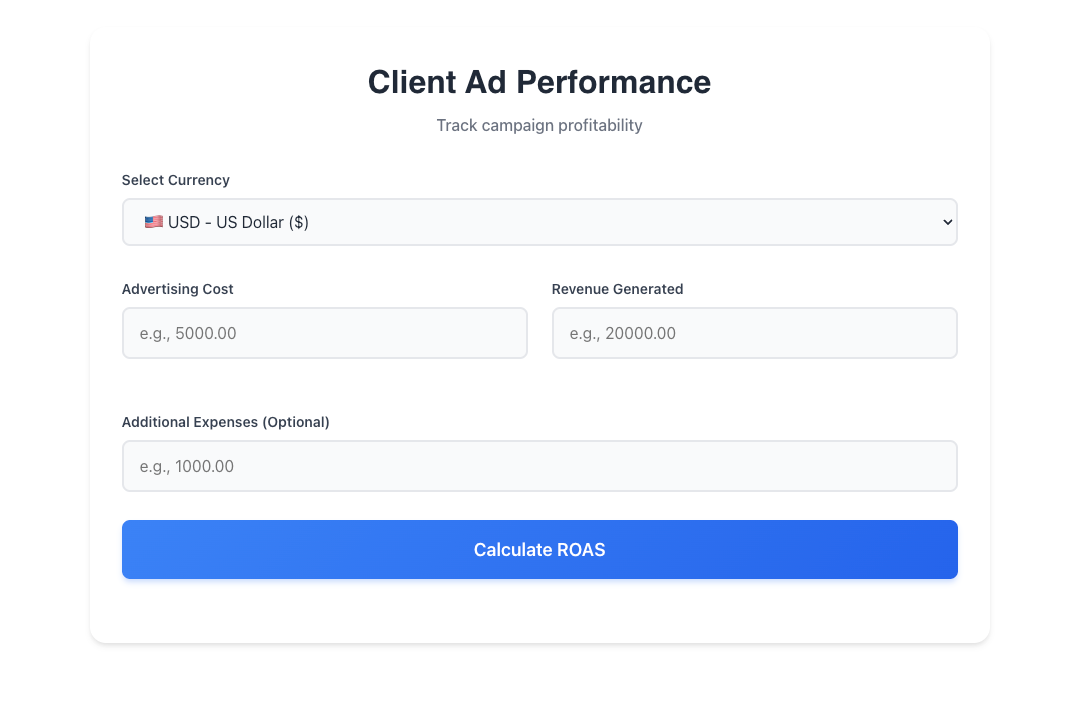
Calculate ROAS NowClient Ad Performance
Track campaign profitability
Key Features of Our Shopify ROAS Calculator
This free Shopify ROAS calculator helps ecommerce merchants measure and optimize their advertising performance with these powerful features.
Instant ROAS Calculation
Enter your ad spend and revenue to get your return on ad spend instantly. This Shopify ROAS calculator uses the industry-standard formula trusted by marketing professionals worldwide.
Break-Even ROAS Analysis
See the minimum ROAS you need to be profitable based on your profit margin. Our ROAS calculator shows whether your ads are truly making money after costs.
Ratio & Percentage Display
View your ROAS as both a ratio (4:1) and percentage (400%). This return on ad spend calculator gives you the numbers in formats that work for any reporting need.
Multi-Platform Compatible
Works with all ad platforms: Facebook Ads, Google Ads, TikTok, Instagram, Pinterest, and more. Pull your data from any platform and calculate ROAS instantly.
Benchmark Comparison
Compare your ROAS against the 4:1 industry benchmark. See immediately whether your campaigns are performing above or below average.
Works on Any Device
Calculate return on ad spend from your desktop, tablet, or phone. Access this Shopify ROAS calculator anywhere, anytime—no downloads required.
How to Calculate ROAS for Your Shopify Store
Follow these simple steps to calculate return on ad spend using our free Shopify ROAS calculator.
Enter Your Ad Spend
Input the total amount you spent on advertising. You can find this in Facebook Ads Manager, Google Ads, or your ad platform’s billing section. Include all ad costs for accurate results.
Enter Revenue from Ads
Add the total revenue generated from your ad campaigns. Use the same time period as your ad spend. Find this in your Shopify Analytics or ad platform conversion reports.
Get Your ROAS Results
Click calculate to see your ROAS as a ratio and percentage. A ROAS of 4.0 means you earn $4 for every $1 spent. Compare against benchmarks to evaluate performance.
Pros and Cons of This Shopify ROAS Calculator
We believe in transparency. Here is what our return on ad spend calculator does well and where it has limitations.
Pros
- ✓100% Free Forever
No hidden fees, no premium tier, and no email required. Calculate unlimited ROAS scenarios at no cost with this Shopify ROAS calculator.
- ✓Uses Standard ROAS Formula
Our calculator uses the industry-standard formula: Revenue from Ads ÷ Ad Spend. Results match what Facebook, Google, and marketing agencies report.
- ✓Break-Even Analysis Included
Go beyond basic ROAS with break-even calculation. See the minimum ROAS you need based on your profit margin to actually make money.
- ✓Dual Format Display
View ROAS as both ratio (4:1) and percentage (400%). Perfect for different reporting requirements and stakeholder presentations.
- ✓Instant Benchmark Comparison
See how your ROAS compares to the 4:1 benchmark and industry averages immediately after calculation.
Cons
- ✗Manual Data Entry Required
This calculator doesn’t connect directly to Facebook, Google, or Shopify. You’ll need to manually enter your ad spend and revenue data.
- ✗Doesn’t Track Attribution
This tool calculates overall ROAS, not multi-touch attribution. For complex attribution models, you’ll need dedicated analytics software.
- ✗Single Time Period
Calculate one time period at a time. For trend analysis across multiple periods, you’ll need to run separate calculations.
- ✗No Saved History
Your calculations aren’t saved between sessions. Export or screenshot results you want to keep for reporting.
What Is ROAS and Why Does It Matter for Shopify Stores?
ROAS (Return on Ad Spend) is a marketing metric that measures how much revenue you generate for every dollar spent on advertising. It’s the clearest indicator of whether your ad campaigns are profitable.
For Shopify store owners, ROAS is essential because it directly tells you if your advertising investment is paying off. Without tracking ROAS, you’re essentially spending money blindfolded—you might be profitable or losing money on every sale, and you’d have no way of knowing.
Understanding your return on ad spend helps you make smarter decisions about which campaigns to scale, which to optimize, and which to cut entirely.
ROAS Formula
Example Calculation
Frequently Asked Questions About ROAS Calculation
Find answers to common questions about calculating and improving return on ad spend for your Shopify store.
What is a ROAS calculator?
A: A ROAS calculator is a free tool that helps you determine your return on ad spend, the amount of revenue you generate for every dollar spent on advertising. This Shopify ROAS calculator divides your ad revenue by ad spend to give you your ROAS as both a ratio and percentage.
How do I calculate ROAS for my Shopify store?
A: Use this free Shopify ROAS calculator: enter your total ad spend and the revenue generated from those ads. The calculator divides revenue by spend to show your ROAS. A ROAS of 4.0 means you earn $4 for every $1 spent.
What is a good ROAS for ecommerce?
A: A good ROAS for ecommerce is typically 4:1 or higher, meaning $4 revenue for every $1 spent. However, “good” depends on your profit margin. Use our break-even ROAS feature to see the minimum ROAS you need to be profitable.
What’s the difference between ROAS and ROI?
A: In Facebook Ads Manager, go to Columns → Customize Columns → add “Purchase ROAS” or “Website Purchase ROAS.” You can also use this Shopify ROAS calculator by entering your spend and purchase conversion value.
How do I find my ROAS in Facebook Ads?
You can improve your profit margins in several ways. First, negotiate better rates with your suppliers to lower product costs. Second, optimize your shipping strategy by comparing carriers or using dimensional weight optimization. Third, reduce your customer acquisition cost by focusing on organic traffic and customer retention. Additionally, consider strategic price increases, as even small changes can significantly boost margins at scale. Finally, reduce returns by improving product descriptions and images.
Why is my ROAS different in Facebook vs Shopify?
A: Attribution differences cause this. Facebook may count a sale within its attribution window that Shopify attributes differently. For accurate ROAS, use consistent attribution settings and time periods in this calculator.
Is this ROAS calculator free?
A: Yes, this Shopify ROAS calculator is 100% free with no hidden costs. No signup or email required. Calculate your return on ad spend as many times as you need at no charge.
How often should I calculate ROAS?
A: Calculate your return on ad spend weekly or monthly to track trends. During heavy ad spend periods (like Black Friday), check daily. Use this Shopify ROAS calculator regularly to catch performance changes early.